AI for Business10 min read
AI Agents for SERP Analysis: 3 Tested Workflows (2026)
AI agents for SERP analysis, tested: 3 workflows with copy-paste prompts, the APIs that fetch live Google data, and where the AI still gets it wrong.
Try it on Merlio:AI chat with Qwen, GPT and Claude
An AI agent for SERP analysis is a model that reads a real Google results page and tells you what to do with it: what the searcher wants, which format wins, which questions nobody answers, and who the AI Overview cites. Give it the page and it's fast and sharp. Ask it to remember one and it makes things up.
We ran three workflows on 25 November 2026 on "how to start a podcast", a keyword with an AI Overview, People Also Ask, videos and Reddit threads all on one page. Here are the exact prompts, the real outputs, the one thing the model missed, and the setup you need when you track dozens of keywords every week.
How we tested
Google.com, US English, logged out, desktop, 25 Nov 2026. Model: Qwen 3.8 Flash, a small and cheap model, on purpose: if a small model gets it right with good input, a big one will too. Every claim below was checked by hand against the live results page.
The short version
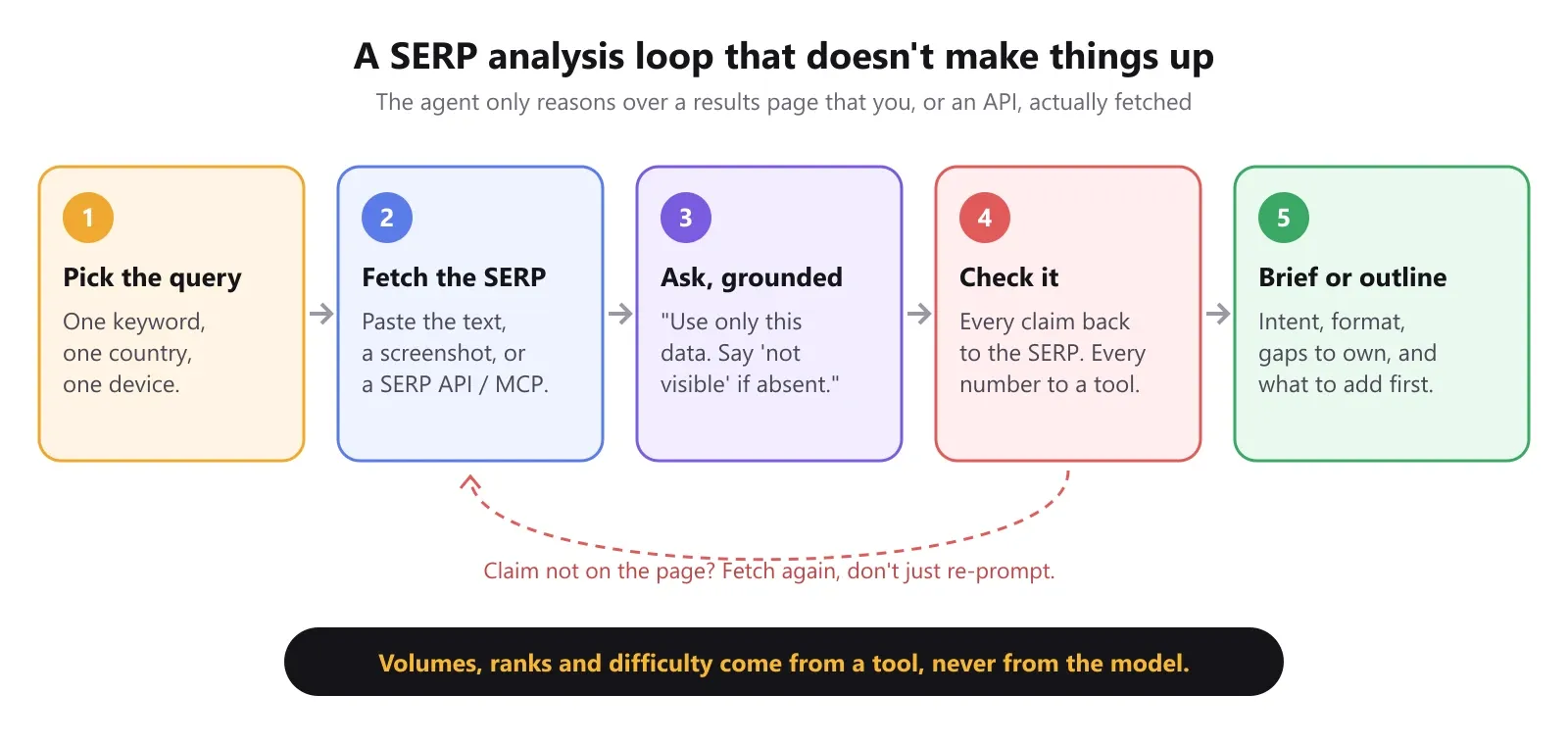
Feed the agent the SERP, never ask it to remember one. Pasted text is enough for intent and gaps. A screenshot catches the AI Overview that copy-paste drops. For recurring tracking, connect a SERP API or your SEO tool's MCP server, and take every number (volume, rank, difficulty) from that tool, never from the model.
What an AI agent can and can't see on Google
Most "SERP analysis with ChatGPT" advice skips the real problem: a chat model doesn't look at google.com. Even when a chat app searches the web, it uses its own search backend, with its own index and location. That helps for research, but it isn't the page your customer sees in Chicago on a phone.
Google says it in its own guidance on AI content: generative models don't retrieve facts. Ask an unconnected model for a keyword's monthly volume or who ranks third and you get a confident guess. So split the job:
- Getting the SERP is your job or a tool's: copy-paste, screenshot, SERP API, SEO suite. This part decides accuracy.
- Reading the SERP is the model's job. Classifying intent, comparing outlines and summarising a messy page is where it saves real time.
Three ways to give an agent the real SERP
| Method | Best for | Catches the AI Overview? | Location control | Cost |
|---|---|---|---|---|
| Copy the page text | Intent, format, People Also Ask, related searches | Often not (collapsed block) | Your browser's location | Free |
| Screenshot the page | AI Overview citations, layout, video blocks | Yes, once expanded | Your browser's location | Free |
| SERP API or SEO MCP server | Many keywords, tracking over time | Yes, on APIs that parse it | Any country, city, device | Free tiers, then paid |
Start with the first two. All you need is a browser and a model that reads text and images. Switch to an API the day you check the same keywords every week.
Workflow 1: intent and SERP features from a pasted results page
Search your keyword logged out (add &hl=en&gl=us to the URL for US English results). Select the results column, copy, paste it under this prompt. Don't skip the "say not visible" line: it lets the model admit a gap instead of filling it.
1You are an SEO analyst. Below is the text of Google's results page for "[KEYWORD]" ([COUNTRY], copied on [DATE]). Use ONLY this text. Don't invent rankings, traffic or numbers; say "not visible" when something isn't in it.21. Dominant search intent, and the content format Google rewards here (guide, video, forum, tool, product page...). Point to the results that show it.32. SERP features present (AI Overview, People Also Ask, videos, forums, shopping...) and what each one means for a new page.43. Who ranks: brands, publishers, forums. Is there room for a smaller site, and where?54. The angle a new page needs to win a click, in 3 bullets.6Format: one short table, then bullets.78SERP TEXT:9[PASTE THE RESULTS PAGE HERE]
Our run thought for 27 seconds and returned this:
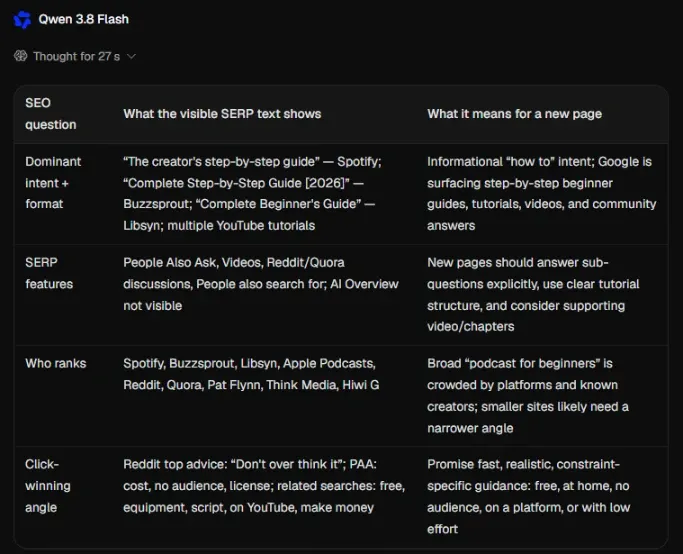
Checked line by line against the page, it got these right:
- Intent: beginner how-to, rewarded as a mix of step-by-step guides (Spotify for Creators, Buzzsprout, Libsyn), YouTube tutorials and Reddit threads.
- The People Also Ask topics (cost, no audience, licence) and the related searches (free, equipment, script, YouTube, make money).
- A smart angle for a small site: don't fight the platforms on the broad query, own a narrower one like "with no audience" or "for free".
- No invented volume, CTR or difficulty. It said they weren't visible.
The miss: "AI Overview not visible". There was one. Google renders it as a collapsed block and our copy didn't include it. The model told the truth about what it had; the copy just left the overview out. Workflow 3 fixes that.
Workflow 2: content gaps from the top pages' headings
Intent tells you what kind of page to write. Gaps tell you what to put in it that the top results don't have. You don't need the full articles, just the H2/H3 outline of the top three pages. Grab it with any page-outline browser extension, your SEO tool's content-gap report, or by copying the headings by hand.
1Below are the H2/H3 headings of the top 3 text results for "[KEYWORD]", and the results page text. Use only this material.21. Topics all three cover (the must-haves).32. Topics only one covers.43. Gaps: People Also Ask questions or related searches that none of the headings answer. Mark near-misses as "adjacent only".54. An outline (H2/H3) for a page aimed at "[NARROWER ANGLE]" that covers the must-haves in less space and owns the gaps.6Keep it tight.78HEADINGS (one block per URL):9[PASTE HEADINGS]1011SERP TEXT (skip if already sent in this chat):12[PASTE THE RESULTS PAGE HERE]
We sent it in the same chat as workflow 1. It thought for 57 seconds and listed the must-haves (concept, format, equipment, recording, editing, hosting, promotion, money), what each page covers alone, and five questions none of the three outlines answer:
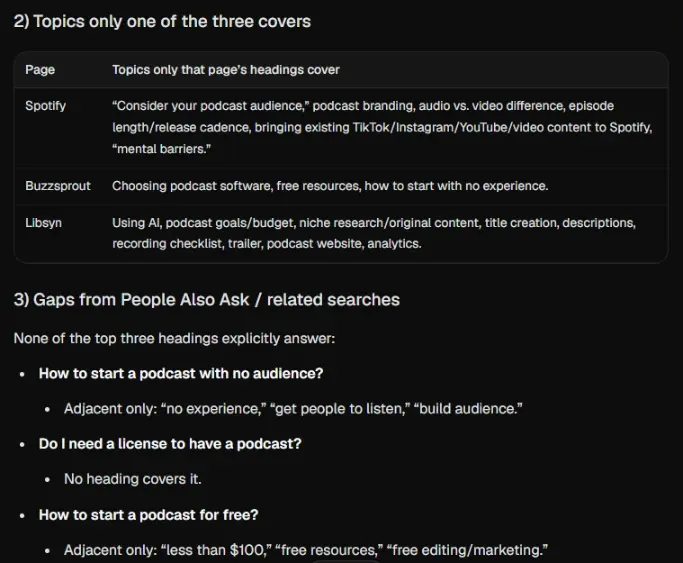
We checked them by hand and they hold. None of the three outlines has a heading on starting with no audience (Buzzsprout's closest is "no experience") or on licences. The model even marked the near-misses "adjacent only" instead of passing them off as answers.
Next step: turn the gap list into a draft outline. Paste it into the free AI outline generator, or keep going in the chat.
Workflow 3: screenshot the SERP to see the AI Overview
AI Overviews change the maths of a results page. In Pew Research's study of 68,879 real searches, people clicked a result 8% of the time when an AI summary showed, against 15% without one. Ahrefs measured a 58% lower click-through rate for the top result on keywords with an AI Overview. On informational queries, Seer Interactive found about 120% more organic clicks per impression for brands cited in the overview than for uncited ones (Seer notes one large account skews that figure). Being cited now matters as much as ranking.
Expand the AI Overview ("Show more"), screenshot it, attach the image, and ask:
1The attached screenshot is Google's results for "[KEYWORD]" with the AI Overview expanded. Only use what you can see.21. Which sources does the AI Overview cite, and which results are shown next to it?32. What does the AI Overview already answer? List the points, so a new page doesn't just repeat them.43. What could a new page add that the AI Overview can't give, and that would make it worth citing? 4 bullets max.
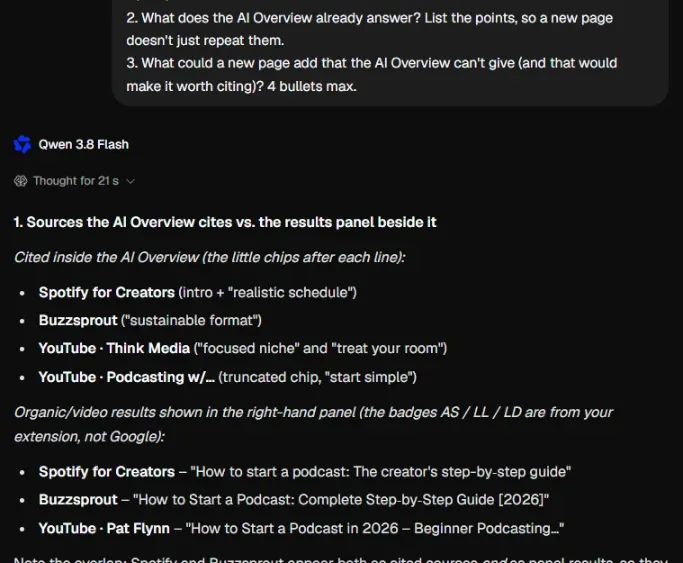
It named the cited sources (Spotify for Creators, Buzzsprout, two YouTube channels) and the three results beside the overview, and noticed that Spotify and Buzzsprout sit in both places. Then it listed what the overview already covers: niche, format, a realistic schedule, a $50 to $200 USB microphone, room treatment. Its advice for earning a citation was the right kind: first-hand data, tested gear at each budget, a real launch timeline with what broke in week one, which a summary can't make up without a primary source.
It also pointed out that the small metric badges in our screenshot came from a browser extension, not from Google. That detail alone justified the screenshot.
Track your own AI Overview impressions
Search Console now has a generative AI performance report that counts impressions in AI Overviews and AI Mode (impressions only, no clicks or queries). Google announced it on 3 June 2026 and rolled it out to all sites by 31 August 2026. It's the cleanest first-party data on whether your pages show up there.
Real-time competitor SERP tracking with an agent
Copy-paste is fine for five keywords. For a weekly watch on fifty, let the agent fetch the SERP itself. The loop is simple, and you can build it in a script, n8n or Make:
- Once a week, a scheduler sends your keyword list to a SERP API with a fixed country and device.
- Save the JSON: positions, URLs, SERP features, and the AI Overview's text and cited links when the API parses them.
- Give the model this week's file and last week's, with the prompt below.
- Get a short diff in Slack or by email. A human decides what to act on.
1Here is this week's SERP data for my tracked keywords (JSON from my SERP API) and last week's. For each keyword list only what changed: new or lost top-10 domains, position moves of 3+ places, SERP features that appeared or disappeared, and changes in the domains the AI Overview cites. Then flag any competitor that entered the top 3. Use only the two files; if a field is missing, say so.23THIS WEEK:4[PASTE JSON]56LAST WEEK:7[PASTE JSON]
What it costs, from DataForSEO's published prices: $0.0006 per results page (top 10, standard queue), and double that with AI Overview loading. Fifty keywords a week is about 217 pages a month, so roughly $0.13 a month, or $0.26 with AI Overviews. You still have to top up $50 to start, and that balance lasts a long time at this rate. On SerpApi, the same 217 searches fit inside the 250 free ones a month.
Prefer your SEO suite? Semrush, Ahrefs and SE Ranking now run MCP servers, so an assistant that supports MCP can query them directly. In Claude you add the server as a custom connector with its URL (SE Ranking's is https://api.seranking.com/mcp) and sign in; Semrush's guide below walks through its own setup.
| Tool | What the agent gets | Entry price |
|---|---|---|
| SerpApi | Google results as JSON, a Google AI Mode API, an MCP server | 250 free searches a month, then $25 a month for 1,000 |
| DataForSEO | SERP, keyword and AI Overview data, open-source MCP server | Pay as you go, $50 minimum top-up, $0.0006 per results page |
| Serper | Fast Google results API | 2,500 free queries, then $50 for 50,000 |
| Bright Data SERP API | Results across engines and locations | 5,000 free requests, then $1.50 per 1,000 |
| Semrush | MCP access on its SEO plans, 50,000 API units a month | Included in paid SEO plans |
| Ahrefs | Remote MCP server from the Lite plan (200,000 units a month on Lite) | Included in paid plans |
| SE Ranking | Hosted MCP: SERP, local rankings, rank tracking, AI visibility | Starts with 100,000 free credits |
Sources: SerpApi pricing, DataForSEO, Serper, Bright Data, Semrush's agent guide, Ahrefs MCP help, SE Ranking MCP. Prices move; check before you commit.
A word on scraping Google
Google's spam policies class automated queries to Google, rank-check scraping included, as machine-generated traffic, and its terms forbid automated access to its services. Google sued SerpApi in December 2025. As of 25 November 2026 the court had dismissed Google's amended complaint with leave to amend, without ruling the scraping lawful. SERP APIs are everywhere, but this is a grey zone: read your provider's terms, and use Search Console for your own site's numbers.
One more prompt for planning
We didn't test this one, but it follows the same rule: hand over the data, forbid invention. Use it on a keyword export from your SEO tool:
1Group these keywords into topic clusters by search intent. Use only the keywords in the list: do not add, merge or rename any. For each cluster give the intent (informational, commercial, transactional, navigational) and the one keyword a page should target.23[PASTE KEYWORD LIST]
Once a cluster has its target keyword and outline, the free SEO title generator and meta description generator give you a first draft of the snippet. Count the characters yourself before you publish.
Where AI SERP analysis goes wrong
- Numbers from nowhere. Volume, difficulty, CTR and positions come from a tool export or an API call. A model that says "about 5,000 searches a month" without one is guessing. Delete it.
- Missing blocks. Copied text can drop the AI Overview, carousels and ads. Screenshot when layout matters.
- Wrong location. Results change by country, city and device. Analyse your audience's SERP, not the one at your desk.
- Stale snapshots. A SERP is a moment. Date every paste and redo the analysis before a big rewrite.
- Chat search isn't Google. "Search the web" in a chatbot returns that app's results, which can be far from Google's top ten.
- Scaling the output instead of the thinking. Agents make it easy to spit out a page per keyword. Google's scaled content abuse policy targets exactly that when the pages add nothing. Use the analysis to make fewer, better pages. And don't try to game AI Overviews: Google applies its spam rules there too.
Which setup fits you
| You are | Volume | Setup that works |
|---|---|---|
| Blogger or small business | A few keywords a month | Browser plus a chat model that reads text and images: workflows 1 to 3 |
| Content or SEO lead | Tens of keywords, recurring | Your SEO suite's MCP server in an assistant, plus the prompts above |
| Agency or developer | Hundreds to thousands | A SERP API with AI Overview parsing, a weekly diff like the one above, a human on the final call |
Whatever the size, the agent reads and you decide. Treat its output as a first draft, check a few claims against the live page, then act.
Run the workflows on your own keyword
All three tests ran in Merlio's AI chat with Qwen 3.8 Flash, which reads both pasted text and screenshots. A free account can pick it and gets 10 messages a day, enough to run the three workflows on a keyword or two; on paid plans Qwen 3.8 Flash costs no credits. For a big gap analysis you can switch to a larger model in the same chat and compare the two answers.
Frequently asked questions
Can ChatGPT or another chatbot analyze a SERP?
Only if you give it the SERP. Paste the results page text or attach a screenshot, then ask about intent, features and gaps. Without that input it guesses, and its own web search uses a different index and location than the Google page your audience sees.
What is the best AI tool for SERP analysis?
It depends on volume. For a few keywords, any chat model that reads text and images does the job. For recurring work, connect your SEO suite's MCP server (Semrush, Ahrefs, SE Ranking). For hundreds of keywords, use a SERP API such as SerpApi, DataForSEO or Serper with a model reading the results.
Can AI tell me a keyword's search volume?
Not on its own. Language models don't look up live data, so volume, difficulty and rankings must come from an SEO tool or API. Treat any number a model gives without a tool call as a guess.
How do I see if my pages appear in AI Overviews?
Search Console's generative AI performance report, rolled out to all sites by August 2026, counts impressions in AI Overviews and AI Mode. For citations on specific queries, screenshot the expanded AI Overview or use a SERP API that parses it.